
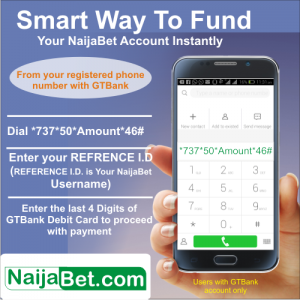
All users who have accounts with GTBank can currently benefit from this using either the GTBank mobile App or the GTBank internet banking or *737*50*Amount*46#.
Kindly note that the funds enter automatically into your NAIJABET account at anytime of the day. You no longer need to make deposit request or call for your deposits to be approved.
For our other user using other banks, you are not left out. We are currently working on a new payment method to enable you deposit funds seamlessly and without stress.
Follow the steps highlighted below to make payment using GTCollections:
Step 1: Kindly log into your GTBank Mobile App
Step 2: Enter your internet banking ID and password
Step 3: Login to your account

Step 4: Click on the drop down menu on the page and select GTCollections
Step 5: Scroll down and click on customized deposits and scroll down to NaijaBet Limited
Step 6: Select the NaijaBet deposit
Step 7: Input your reference ID (Username as it appears in your NaijaBet Account), enter the amount and click on continue
Step 8: Select your account
Step 9: Enter your transaction pin (4 digit pin) or your OTP code (One time password or Token ID number)
Step 10: Click on confirm payment
Payment successful displays. This shows that the transaction has been successfully completed. The money reflects in your NaijaBet.com account instantly.
